Showing posts with label Incremental Load. Show all posts

Saturday, 4 February 2017

NEW Incremental Process strategy for SSIS

Introduction
We are always trying to provide some useful solution for SSIS developer. Here in this article we are trying to make some incremental process of loading data where source have huge amount of data. It’s a strategy only not the complete solution. You can get a new idea how to handle with huge amount records when you’re dealing with data migration.

Case Scenario
We have a source and destination table object in different DB and different server. Environment of source DB may be very. It may be flat file, Oracle, DB2 etc and the Destination is SQL server in our case (Although the Destination may be very).
Our main job is to move all data from source table to our destination table.

We have to understand certain thing over here
1.    The source data is huge
2.    The source is ever increasing. That means NEW records is always added in the source table.
3.    The data of the source may be modified any point of time.

In one wards the source is LIVE.
Don’t worry; we have the solution for that.

Constraint
Before going to the solution we have some constraint that we need to discuss, others we are unable to build the solution.

1.    Source must have Identity type Primary Key columns.
2.    Source must have Date Type columns called the Last Modified Date (LMDT). When the new records Inserted into the source tale it put the Current Date to the LMDT columns. When the records is Updated the LMDT columns is updated by current Date value.

If all the constraint value meets, we can move into the solution.

What the solution is
The solution is quite simple. We just follow certain steps to achieve it.

1.    Find the Maximum (MAX) value of the Primary Key columns of Destination Table.
2.    Find the Maximum (MAX) value of Last Modified Date (LMDT) of Destination Table.
3.    Now Check the Source table Primary key columns value with MAX value of Primary key columns of Destination Table.
Get All the Records from source which has Greater value of MAX value of Destination for Insert as New Records.
4.    Again check the Source Table Primary key columns value which have less value of MAX value of Destination and Last Modified Date (LMDT) of Source is Greeter then the Maximum (MAX) value of Destination for Update.
Here we are putting those records in a staging table to do the operation by SQL statement.

SSIS Solution

Step -1 [ Source and Destination Table ]

--Source Table
CREATE TABLE [dbo].[tbl_EmployeeDetails]
  (
     EmpID   INT         NOT NULL IDENTITY PRIMARY KEY,
     EmpName VARCHAR(50) NOT NULL,
     Grade   CHAR(1)     NOT NULL,
     LMDT    DATE        NOT NULL
  );
 

SELECT * FROM [dbo].[tbl_EmployeeDetails];

EmpID   EmpName                           Grade     LMDT
1              Joydeep Das                        C             2014-10-01
2              Debleena Bhattacharya       C             2016-10-01
3              Priya Baannerjee                 C             2015-10-01
4              Sarmila Das                         C             2015-10-01
5              Deepasree Das                     C             2015-10-01
6              Rajeev Ranjan                     C             2017-01-01
7              Madhu Mita                         C             2017-01-01

--Destination Table

CREATE TABLE [dbo].[tbl_EmployeeDetails_Dest]
  (
     EmpID      INT             NOT NULL PRIMARY KEY,
     EmpName    VARCHAR(50)     NOT NULL,
     Grade      CHAR(1)         NOT NULL,
     LMDT       DATE            NOT NULL
  );

Step-2 [ Create a Staging Table ]

--Staging Table
CREATE TABLE [dbo].[tbl_EmployeeDetails_Dest_Stage]
  (
     EmpID      INT             NOT NULL,
     EmpName    VARCHAR(50)     NOT NULL,
     Grade      CHAR(1)         NOT NULL,
     LMDT       DATE            NOT NULL
  );

Step-3 [ The Control Flow of SSIS ]


Step – 4 [ Execute SQL Task – Pic MAX Records ]

Here we are using variables to get the MAX records

Name
Scope
Data  Type
v_MAX_ID
Package Level
Int32
v_MAX_DT
Package Level
DateTime

SQL Statement:

SELECT ISNULL(MAX(EmpID), 0),
       ISNULL(MAX(LMDT), '1990-01-01')
FROM   [dbo].[tbl_EmployeeDetails_Dest];

Step-5 [ Data Flow Task – Insert NEW Records ]


SQL Statement:
SELECT * FROM [dbo].[tbl_EmployeeDetails] WHERE EmpID >= ?;


Step-6 [ Execute SQL – Truncate Staging ]


SQL Statement:
TRUNCATE TABLE [dbo].[tbl_EmployeeDetails_Dest_Stage];

Step-7 [ Data Flow task – UPDATE to Staging ]


SQL Statement:
SELECT *
FROM [dbo].[tbl_EmployeeDetails]
WHERE EmpID < ? AND LMDT > ?;


Step-8 [ Execute SQL – Update Destination ]

SQL Statement:
UPDATE t
  SET  t.EmpName = s.EmpName,
       t.Grade   = s.Grade,
        t.LMDT    = s.LMDT
  FROM [dbo].[tbl_EmployeeDetails_Dest] AS t
       INNER JOIN [dbo].[tbl_EmployeeDetails_Dest_Stage] AS s
        ON t.EmpID = s.EmpID;


Observation

Step- 1[ First – Run of SSIS Package ]

SELECT * FROM [dbo].[tbl_EmployeeDetails_Dest];

EmpID   EmpName                         Grade     LMDT
1              Joydeep Das                      C             2014-10-01
2              Debleena Bhattacharya     C             2016-10-01
3              Priya Baannerjee               C             2015-10-01
4              Sarmila Das                       C             2015-10-01
5              Deepasree Das                   C             2015-10-01
6              Rajeev Ranjan                   C             2017-01-01
7              Madhu Mita                       C             2017-01-01

Step-2 [ Update Source and Run SSIS package Again ]

UPDATE [dbo].[tbl_EmployeeDetails]
SET EmpName = 'Joydeep Debbarma',
    LMDT = GETDATE()
WHERE EmpID=1;

Now the source record is modified

SELECT * FROM [dbo].[tbl_EmployeeDetails];

EmpID   EmpName                        Grade      LMDT
1              Joydeep Debbarma            C             2017-02-04
2              Debleena Bhattacharya     C             2016-10-01
3              Priya Baannerjee               C             2015-10-01
4              Sarmila Das                       C             2015-10-01
5              Deepasree Das                   C             2015-10-01
6              Rajeev Ranjan                   C             2017-01-01
7              Madhu Mita                       C             2017-01-01

Step-3 [ Run the SSIS Package Again and Observe Destination ]

SELECT * FROM [dbo].[tbl_EmployeeDetails_Dest];

EmpID   EmpName                         Grade     LMDT
1              Joydeep Debbarma            C             2017-02-04
2              Debleena Bhattacharya     C             2016-10-01
3              Priya Baannerjee               C             2015-10-01
4              Sarmila Das                       C             2015-10-01
5              Deepasree Das                   C             2015-10-01
6              Rajeev Ranjan                   C             2017-01-01
7              Madhu Mita                       C             2017-01-01

Comments

Here we are not using any MERGE statement as we don’t like to use it as MERGE have some performance issue.
We can make it as for DELETE operation also.


Hope you like it.


Posted by: MR. JOYDEEP DAS

Wednesday, 11 November 2015

Incremental Load without CDC in SSIS

Introduction
In my previous article we are demonstrating CDC as Incremental load in SSIS. But what happens, if CDC is not there. We can do it without CDC also. Here in this article we are going to demonstrate same Incremental load without CDC. Hope it will be informative and you enjoy the session.

What the scenario is
We are taking the same Scenario that we take in the CDC.
We have a table object named tbl_EmployeeDetails like this


EmpID (PK)
EmpName
Designation
DOJ
1
Joydeep Das
A
2015-02-01
2
Deepasree Das
B
2013-05-01
3
Santi Nath Mandal
A
2012-03-01

And we are going to load data into tbl_Employee table in our production DB without using CDC for incremental load.

How to Do That
Here we are going to describe the main steps or logic to implement this scenario and we hope that you have well understanding with SSIS and no need to describe all the steps.

Step – 1 [ Preparing the Base Table in Source ]

Here we are altering our previous table and adding two extra columns in the name of InsertedDT and UpdatedDt with data type DATETIME. As we are not using CDC, these two columns represent the CDC works for us.
Whenever a new records is Inserted the InsertedDT and UpdatedDT is taking the GETDATE() values and whenever the records is Updated the UpdateDT columns is modified not the InsertedDT columns.

IF OBJECT_ID(N'[dbo].[tbl_EmployeeDetails]', N'U')IS NOT NULL
   BEGIN
      DROP TABLE [dbo].[tbl_EmployeeDetails];
   END
GO

CREATE TABLE [dbo].[tbl_EmployeeDetails]
  (
   EmpID          INT         NOT NULL IDENTITY PRIMARY KEY,     
   EmpName        VARCHAR(50) NOT NULL,
   Designation    CHAR(1)     NOT NULL,
   DOJ            DATETIME    NOT NULL,
   InsertDT       DATETIME    NULL,
   UpdateDT       DATETIME    NULL
  );
GO

It is good it the Insert and Update method take care of the Last two columns i.e. InsertDT and UpdateDT.
 If not, we have to make a simple trigger in this table to take care of those columns.

How to prepare the Trigger

IF OBJECT_ID(N'[dbo].[trg_EmpDtlsInsert]', N'TR')IS NOT NULL
   BEGIN
       DROP TRIGGER [dbo].[trg_EmpDtlsInsert];
   END
GO

CREATE TRIGGER [dbo].[trg_EmpDtlsInsert]
ON [dbo].[tbl_EmployeeDetails]
AFTER INSERT
AS
BEGIN
DECLARE @v_Empid  INT;

SELECT * INTO #temp_Inserted FROM inserted;

IF EXISTS(SELECT * FROM #temp_Inserted)
      BEGIN
            SET @v_Empid = (SELECT EmpID FROM #temp_Inserted);
                   
            UPDATE [dbo].[tbl_EmployeeDetails]
                  SET InsertDT = GETDATE(),
                        UpdateDT = GETDATE()
            WHERE EmpID = @v_Empid;
                       
      END
END
GO

IF OBJECT_ID(N'[dbo].[trg_EmpDtlsUpdate]', N'TR')IS NOT NULL
   BEGIN
       DROP TRIGGER [dbo].[trg_EmpDtlsUpdate];
   END
GO

CREATE TRIGGER [dbo].[trg_EmpDtlsImsertUpdate]
ON [dbo].[tbl_EmployeeDetails]
AFTER UPDATE
AS
BEGIN
DECLARE @v_Empid  INT;

SELECT * INTO #temp_Inserted FROM inserted;

IF EXISTS(SELECT * FROM #temp_Inserted)
      BEGIN
            SET @v_Empid = (SELECT EmpID FROM #temp_Inserted);

            IF UPDATE(EmpName) OR UPDATE(Designation) OR UPDATE(DOJ)
                  BEGIN
                        UPDATE [dbo].[tbl_EmployeeDetails]
                              SET UpdateDT = GETDATE()
                        WHERE EmpID = @v_Empid;
                  END
      END
END
GO

Now Insert Some Records

INSERT INTO [dbo].[tbl_EmployeeDetails]
  (EmpName, Designation, DOJ)
VALUES('Joydeep Das', 'A', '2012-09-01');
GO

INSERT INTO [dbo].[tbl_EmployeeDetails]
  (EmpName, Designation, DOJ)
VALUES('Deepasree Das', 'B', '2011-07-01');
GO

SELECT * FROM [dbo].[tbl_EmployeeDetails];

EmpID
EmpName
Designation
DOJ
InsertDT
UpdateDT
1
Joydeep Das
A
2012-09-01
2015-11-11 21:22:41.043
2015-11-11 21:22:41.043
2
Deepasree Das
B
2011-07-01
2015-11-11 21:22:41.070
2015-11-11 21:22:41.070

Destination Table in Production DB

IF OBJECT_ID(N'[dbo].[tbl_Employee]', N'U')IS NOT NULL
   BEGIN
      DROP TABLE [dbo].[tbl_Employee];
   END
GO

CREATE TABLE [dbo].[tbl_Employee]
  (
   EmpID          INT         NOT NULL PRIMARY KEY,  
   EmpName        VARCHAR(50) NOT NULL,
   Designation    CHAR(1)     NOT NULL,
   DOJ            DATETIME    NOT NULL
  );
GO

Now the preparation is over and we are going to make the SSIS Package.       
                 
Step – 2 [ Introducing the Table to Track the Last Execution Date of Package ]

Here we introduce a new table which will track the Last execution date and time of the package so that if any data modification happens after that date time we must sink it with production table.

IF OBJECT_ID(N'[dbo].[tbl_ExecutionTracker]', N'U')IS NOT NULL
   BEGIN
      DROP TABLE [dbo].[tbl_ExecutionTracker];
   END
GO

CREATE TABLE [dbo].[tbl_ExecutionTracker]
  (
   Descr          VARCHAR(50) NOT NULL PRIMARY KEY,  
   LastExecDt     DATETIME    NOT NULL
  );
GO

-- Insert Records one day old to run the package
INSERT [dbo].[tbl_ExecutionTracker]
   (Descr, LastExecDt)
SELECT 'LastExec' As Descr, GETDATE()-1 AS LastExecDt;
GO

SELECT * FROM [dbo].[tbl_ExecutionTracker];

Descr              LastExecDt
LastExec         2015-11-10 21:37:37.333

Step – 3 [ SSIS Package ]

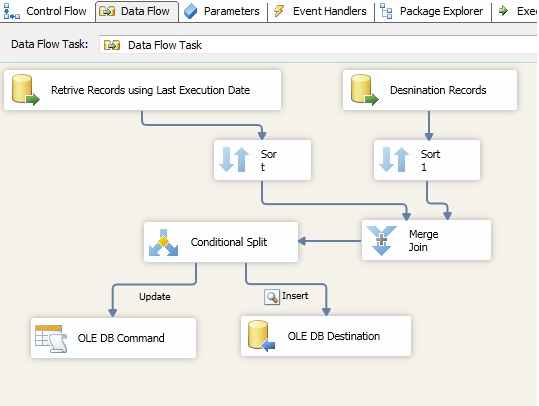
The simple logic is that the Package Extract the Data from source Greeter then or Equals to the Last Exec Dt.
So 

UpdateDt  >=  LastExecDt


Control Flow Task

[A] Execute SQL 1:


Here we are showing you what we do in the Execute SQL task named Retrieving Last Execution Date.


In SQL Statement:
SELECT LastExecDt
FROM   [dbo].[tbl_ExecutionTracker]
WHERE  Descr = 'LastExec';

[B] Execute SQL 2

In SQL Statement:

UPDATE [dbo].[tbl_ExecutionTracker]
   SET LastExecDt = GETDATE()
WHERE Descr = 'LastExec';
GO

Data Flow Task


OLEDB source -1 [ Retrieving Records using Last Execution Date ]


Conditional Split


 Step-4 [ Run the Package ]

First time Run

SELECT * FROM tbl_ExecutionTracker;

Descr                     LastExecDt
LastExec               2015-11-10 21:37:37.333


SELECT * FROM  [dbo].[tbl_Employee];

EmpID   EmpName                        Designation            DOJ
1              Joydeep Das                      A                             2012-09-01 00:00:00.000
2              Deepasree Das                  B                              2011-07-01 00:00:00.000

Now see the Last Execution Date

SELECT * FROM tbl_ExecutionTracker;

Descr                     LastExecDt
LastExec               2015-11-11 22:43:46.743

Now Insert a New Record and Modify Old Records

INSERT INTO [dbo].[tbl_EmployeeDetails]
  (EmpName, Designation, DOJ)
VALUES('Sukamal Jana', 'A', '2009-01-01');
GO


UPDATE [dbo].[tbl_EmployeeDetails]
   SET EmpName = 'Soni Sethi'
WHERE EmpID = 1;
GO

SELECT * FROM [dbo].[tbl_EmployeeDetails];

EmpID
EmpName
Designation
DOJ
InsertDT
UpdateDT
1
Soni Sethi
A
2012-09-01
2015-11-11 21:22:41.043
2015-11-11 21:22:41.043
2
Deepasree Das
B
2011-07-01
2015-11-11 21:22:41.070
2015-11-11 21:22:41.070
3
Sukamal Jana
A
2009-01-01
2015-11-11 22:48:23.653
2015-11-11 22:48:23.653

Now run the Package again


Now see the destination table
SELECT * FROM  [dbo].[tbl_Employee];

EmpID   EmpName           Designation            DOJ
1              Joydeep Das         A                             2012-09-01 00:00:00.000
2              Deepasree Das      B                             2011-07-01 00:00:00.000
3              Sukamal Jana        A                             2009-01-01 00:00:00.000


Summary
The main thing in the package is how to retrieve data from source depending on execution date.


Hope you like it.


Posted by: MR. JOYDEEP DAS